Rust · Dioxus 0.7 · MIT
Your own AI agents, on your phone
Goose Mobile is a client for agents that run on your machine — reached privately over Tailscale, with no hosted service in between.
It speaks to two kinds of backend: a goose server over the Agent Client Protocol, and code agents — one OpenCode container per chat — over HTTP and SSE. One Rust codebase, built with Dioxus, runs on iPhone, on Android, and on the desktop.
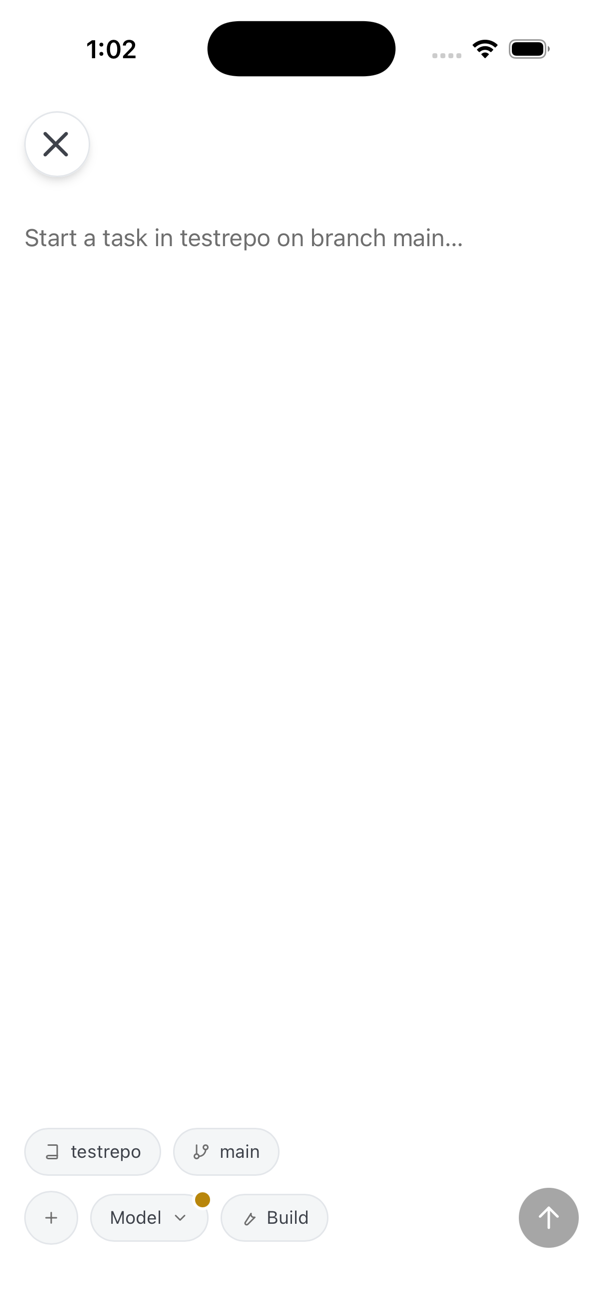
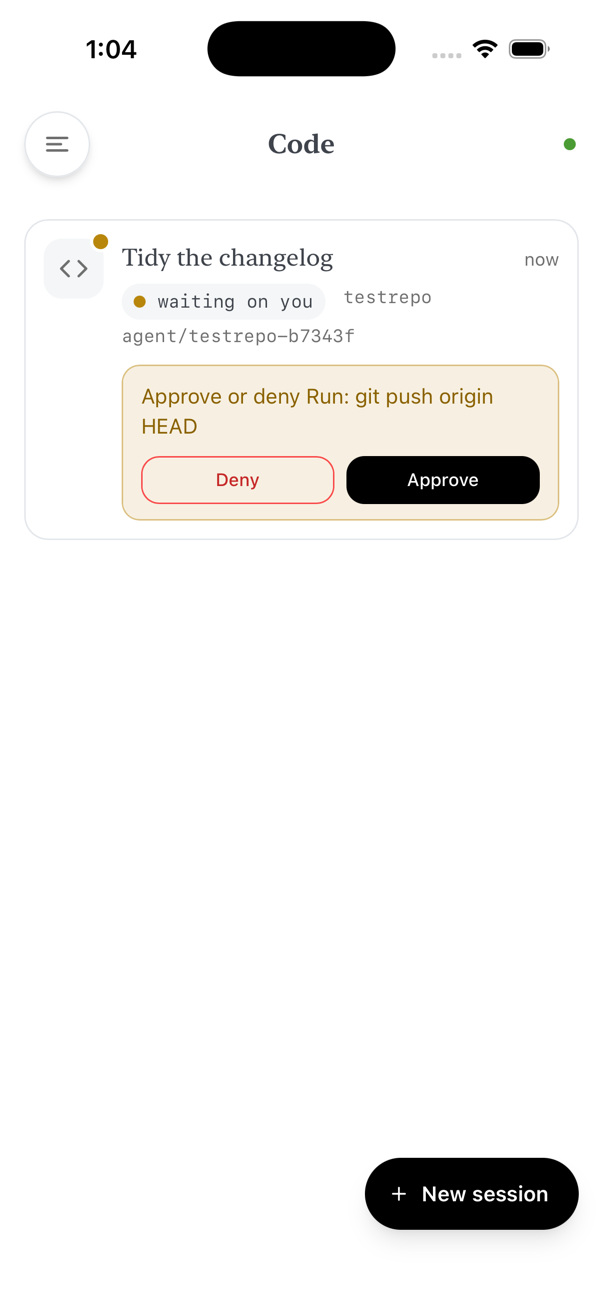
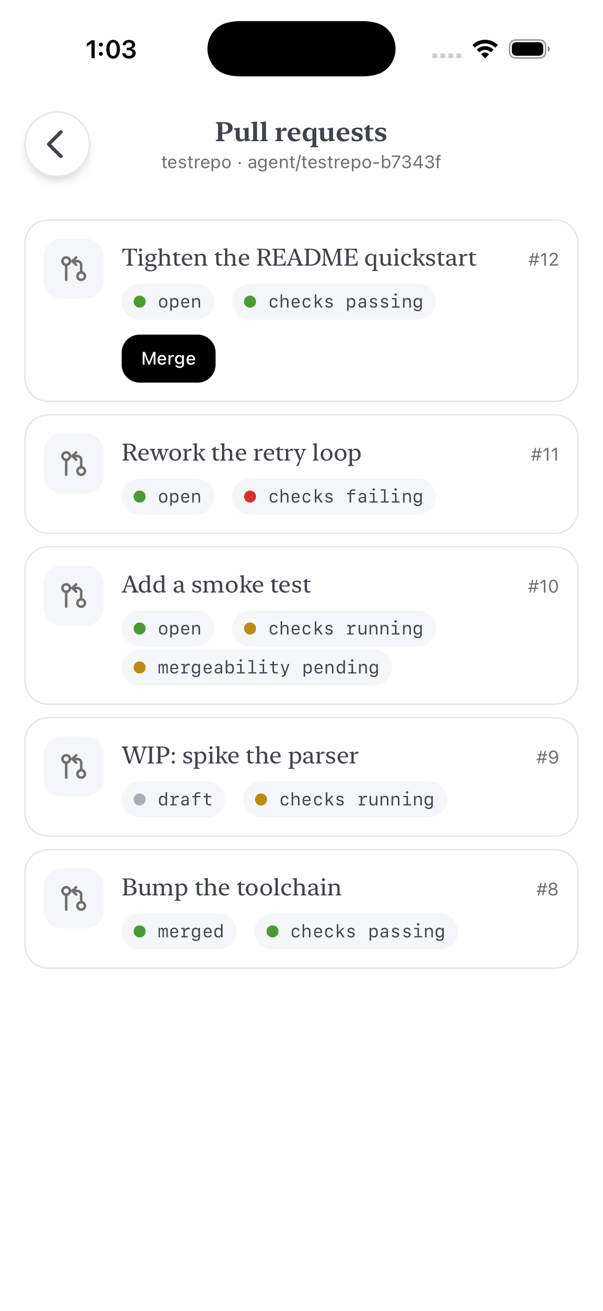
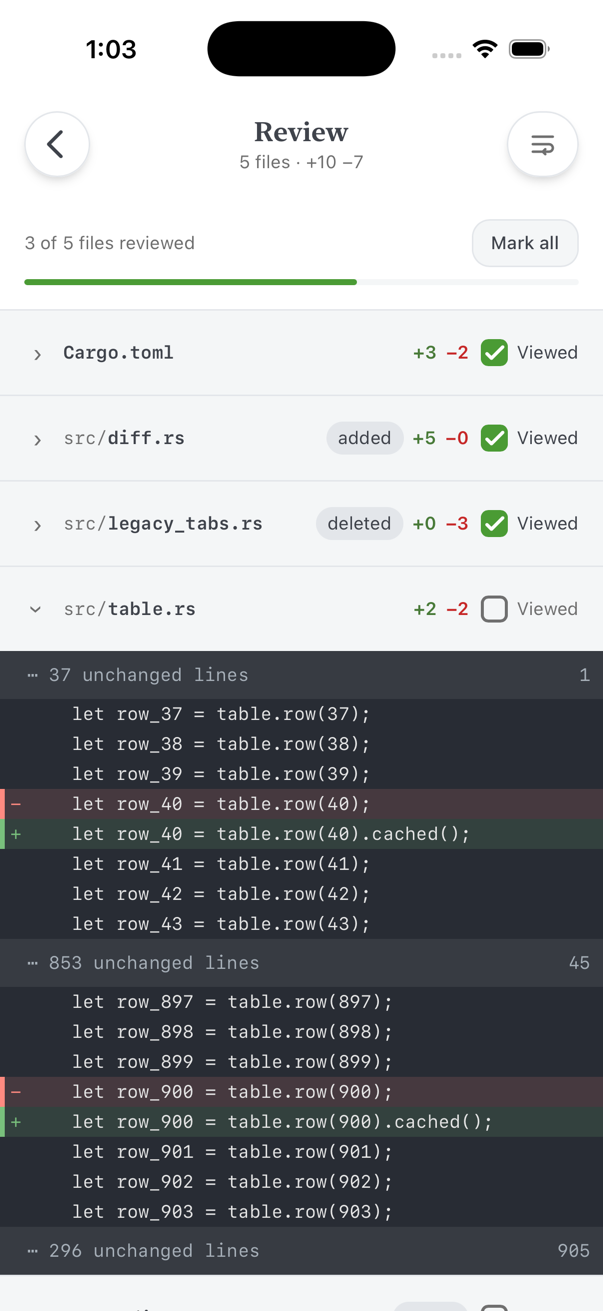
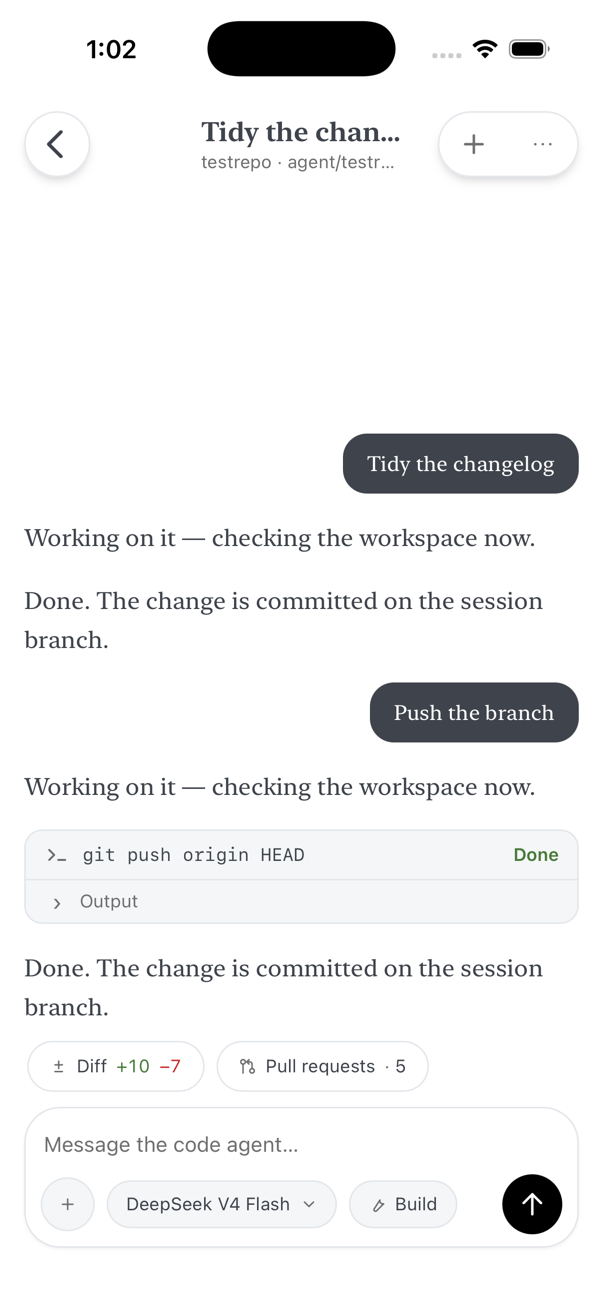
The running app, not mock-ups: all five are captures off an iPhone 17 Pro simulator, taken from the build these pages were written against. They are light mode; the app follows the system and has a dark set of the same tokens.
For markup that cannot drift there is the
style gallery:
twenty-seven states dumped out of the app's own DOM, including every one shown
here. That is what docs/audit.js reads, so a screen only escapes
being checked for contrast, overflow and tap-target size if nobody ever drove
the app to it.
Two backends, one app
Each has its own protocol library in the workspace, UI-independent and reusable.
goose, over a WebSocket
goose ≥ 1.42 exposes one API:
the Agent Client Protocol, JSON-RPC 2.0
served by goose serve at /acp. The app speaks it over a
WebSocket — the same transport the official goose desktop app uses.
crates/goose-acp-client is that half: tokio, tungstenite and rustls,
with no UI framework anywhere in it, so it builds unchanged for iOS, Android and
desktop.
Code agents, over HTTP and SSE
A code chat is its own OpenCode container on your
server, behind a session manager that wakes a stopped one on the next request. One
base URL carries both layers: /api/… for chat lifecycle,
/chat/<id>/… for that chat's own OpenCode HTTP API, with its
event stream on SSE.
Opened chats are cached on the device, so a sleeping chat's transcript is on screen
while its container boots. The client is crates/opencode-client
(reqwest + rustls); the server side is the code-agent manager from
personal-ai-setup.
What it does
Everything here works against both backends unless it says otherwise.
- Streaming transcript
- Replies stream in as markdown — code blocks, tables, lists — with the agent's reasoning in a collapsible Thinking section.
- Tool output that folds
- Each tool call is a card with live status and its output. A run of two or more settled calls collapses to one line you can open — unless something in it failed or is still running, which is exactly when you want to see it.
- Permission prompts
- The agent's permission asks queue up and you answer them from the phone: goose renders whichever options its server sent, a code agent gets once, always, or reject. A code agent blocked on one says so on the list and can be answered without opening it — the manager aggregates pending asks across running containers, so a sleeping chat is never woken just to be polled.
- Diff review
- A code chat's cumulative diff, one line per file holding its path, its counts and a Viewed checkbox, with the code running the full width of the screen and a wrap toggle for long lines. OpenCode returns whole-file patches, so the re-hunking that makes them readable at 402px happens on the device.
- Model, effort and mode, per session
- Two chips on the composer, on one line with the send button. One opens a sheet holding whatever that backend can actually change — provider, model, thinking effort; the other picks the mode a turn runs in, goose's own or an OpenCode agent. Both state a resolved value rather than naming themselves, so a chip is never a question. What cannot change, like the context window, is stated as a fact rather than offered as a control that does nothing.
- Starting a code session
- A composer, not a form: you write the task, and the placeholder names what it will run against. The repository, the base branch to cut from, the model and the mode are pills above the keyboard, each opening a sheet that filters once the list is long enough to need it. The model is required — a session that began without one had nothing to report afterwards, which is why the chips used to name themselves.
- Pull requests
- A code chat's branch gets its own screen: the pull requests open off it, each with its state and check status, and merged from the phone when GitHub says it can be. When it cannot — a draft, failing checks, a conflict — the row says which, instead of showing a button that would fail.
- Attachments
- Send a photo, a screenshot or a file with a message, on either backend. The picker is the system's own — photo library, camera, Files — and images are downscaled on the device, so a 12-megapixel capture does not become a multi-megabyte request over the tailnet. Anything too large, or of a type the agent cannot read, is refused by name rather than dropped.
- Sessions
- Browse, resume and delete server-side sessions. Swipe a row left for its delete tray; the confirm is a sheet. Pull a list down to refresh it — there is no refresh button on any screen. History replays through the same renderer as live output, so a resumed chat looks identical.
- Built for a flaky network
- Stop cancels a running turn, and dropped connections reconnect and replay history. On the goose socket a 30-second keepalive that gives up after two unanswered pings catches the half-open connection you get from switching networks — the classic “connected, but nothing happens”.
- Light and dark
-
Both themes follow the system, and both are checked by the same tool:
docs/audit.jswalks every captured screen in each of them and exits non-zero on a contrast or geometry finding.
Private by construction
There is no account, no relay and no service of ours in the path. The app talks to the one server you point it at.
-
Reachability is Tailscale's job.
tailscale servepublishes the machine on your tailnet with a real Let's Encrypt certificate while goose stays bound to localhost, so nothing is exposed to the public internet. - The goose plane authenticates with a shared secret; the code plane with a password over TLS. Both are stored in the app-private data directory and sent only to the server you configured.
-
For
goose serve --tls's self-signed certificate, the app pins the SHA-256 fingerprint goose prints — the same scheme the goose desktop app uses. - Permission prompts are the last line of defence, which is the argument for leaving the agent in an approval mode when you reach it from a phone.
One codebase, three targets
Desktop is not an afterthought: it is the default cargo feature and the development loop.
Desktop
dx serve --desktop
iPhone
dx serve --ios --device
Android
dx serve --android --device
Networking is pure Rust, so iOS App Transport Security does not intercept it and plain HTTP over the tailnet works without an exception. Signing is the fiddly part of a device install; the iPhone walkthrough covers it end to end.
Start
The short version. The README has the whole thing, including the code-agent side.
-
Run goose as a server
On any always-on Linux or macOS box, with an AI provider already configured.
GOOSE_SERVER__SECRET_KEY='pick-a-long-random-secret' \ goose serve --platform desktop --enable-scheduler \ --host 127.0.0.1 --port 3284 -
Put it on your tailnet
With MagicDNS and HTTPS Certificates on, this gives you a real certificate on the tailnet name.
sudo tailscale serve --bg 3284 ./scripts/check-server.sh # verifies the shape the app needs -
Build and connect
Try it on your computer first; the settings screen takes the server URL, the secret and a working directory.
curl -sSL https://dioxus.dev/install.sh | bash
dx serve --desktop
No server? No API key?
The workspace ships a protocol-faithful fake goose server — /status,
/acp and the four permission options the real one routes — so the
whole goose side can be exercised without either. The Code screens are the
exception: they need the code-agent manager.
cargo run -p mock-goose-server # 127.0.0.1:3285, secret "mock-secret"How it is kept honest
The look on this page is the app's own design system, tokens and all.
A written design language
assets/main.css is the whole system — semantic tokens in both themes,
tiered rounding, borders that separate and shadows that float.
docs/design.md
records each rule and the measurement behind it.
A gallery it cannot fake
The style gallery is captured out of the running app's DOM by a script, not written by hand: seventeen states, each in a 402×874 frame linking the app's live stylesheet. Open it from a checkout and all seventeen are there, with no build and no device. A run replaces the set, so a screen that stops existing stops being audited — and one never driven to, like the permission sheet, was never in it.
Checks that fail loudly
docs/audit.js walks every captured state in both themes for contrast
(4.5:1 text, 3:1 icons), overflow, clipped text, square corners and undersized tap
targets, and exits non-zero. CI adds rustfmt, clippy's pedantic and nursery groups
as errors, the test suite and coverage; unsafe_code is forbidden
workspace-wide.